Tag: canada

  • Lesson 9

    Computer skills: Spreadsheets

    This is our ninth study session. It is also the first session of Season 2. (formal session on Tue. April 26, 2022), done remotely. A & A are in Florida, Grand Dad is up north. Note, all links open a new tab in your browser.

    There will be two sessions.

    • Please work on this lesson Monday April 25 on your own, at your own pace, any time.
    • Then let’s join together on Tuesday over Brave Talk to go over this lesson together. We can see how you did, and do some typing and adding numbers together. I’ll send you the Brave Talk link in time for the meeting.

    Spreadsheets

    Q: What is a spreadsheet and what is it used for?

    A spreadsheet is an electronic set of squares arranged in rows and columns that allow you to write text and numbers. You can calculate the numbers. It’s basically a mathematical matrix of columns. Each column and even each cell is “smart.”
    Workshop

    Let’s go to an online spreadsheet now and learn how to use it. Note, often you would use spreadsheet software right on your computer (not online). Examples of “on computer” spreadsheet software are: Microsoft Excel and Apple Numbers. An example of an online version is Google Sheets.

    Since Microsoft, Apple, and Google don’t respect your privacy, let’s try Ethercalc, which is open software.

    Go to this link at Ethercalc.net

    Here’s what we want to do. We will add up the number of fruits we bought at the store. You bought a certain number of bananas, a certain amount of apples, a few pears, and a bunch of oranges. Create a heading at the top of the column (Type of fruit, and Number of Fruit). Write your fruit names in each cell in column A, and write the number of each fruit in column B. Total the amount of fruits.

    • Delete the text that is there now.
    • Type the header for the fruits and the header for the number of each.
    • List the four types of fruit.
    • Enter the number of each fruit that you bought.
    • Type “Total” at the bottom of the Fruit column.
    • Type in the “Sum” command at the bottom of the fruit column. It will automatically add up the fruits.
    Type of FruitNumber of Fruit
    bananas6
    apples3
    pears2
    organges6
    Total??
    In the online spreadsheet, enter the kind of info I’m showing you here and then “sum” the number column

    Here’s the syntax of the sum command: =sum(B1:B4)

    Explanation of the Sum Command. In the cell, start with the equals sign =. That tells the cell it needs to do a calculation. The word sum tells it to create a sum or total of the specified range of cells in the round brackets. The range you typed tells the cell to add up column B’s cells from cell 1 to cell 4. Note, you can type the range, or instead you can highlight the range using your mouse. After highlighting the cells, you simply type the right round bracket ) and hit Enter. Either way works.

    Here’s a video on how the Sum command works.

    Try creating your own spreadsheet now and send me the link in our Telegram group. Maybe you can do a spreadsheet of a collection, or a simple budget. If you decide on a budget, pretend you have grown up and moved out. How would you keep track of your rent, food, car payment, phone payment, clothes budget, etc. You can do that in a spreadsheet.

    Free downloadable spreadsheet software:

    Note, your mom’s Macbook probably has the “Numbers” spreadsheet on it. That will be fine to use. If not, or if you get your own computer, I list two other spreadsheets below …

    Here are two software programs you can download and use on your computer. Note, both come as part of a bigger suite of productivity tools called “Office.” So you probably have to download the whole suite. The spreadsheet is part of the whole program.

    Libre Office Calc

    Softmaker Planmaker

    The Best Online Spreadsheet Program: Zoho

    Optional. Feel free to register at Zoho. It is a full suite of many applications such as email, calendar and spreadsheet. You can register here if you like. Zoho is an excellent alternative to Google and Gmail.


    CLASS FEEDBACK and REVIEW

    Once you’ve done the session and spent a bit of time reviewing how to use a spreadsheet, please send me a message in our Telegram group that you’ve done the review. And send me a link to either your own Ethercalc or Zoho spreadsheet. Thanks!
  • Lesson 8

    Geography (and a bit of history): Building a Lesson Together

    This is our eighth study session (designed Thur. June 17, 2021; studied Wed June 23).

    Follow up of Niagara visit

    1. War of 1812 / Laura Secord

    The War of 1812 lasted from 1812 to 1815. It was a conflict between the United States and Great Britain over maritime rights. Study the links below to get more info.

    Britannica Article

    Video

    2. Sir Adam Beck Power Generating Station

    This hydro-electric power generating station was built in 1917 (it was conceived in 1905). It was not the very first station, but is the most famous of the early stations. There were some private stations (owned by individuals, not the government) in operation in the Niagara Falls area as early as the late 1800’s.

    Wiki Article

    Professional Engineers Article

    Video

    Starting New Topics

    1. Physical Geography

    Video (What is Physical Geography)

    Second Video (Andrew to choose)

    Brief Introduction (to be written by Andrew)

    Andrew to write this section. Please digest what “physical geography” is, and then write about 4 to 8 sentences to describe it. Please also find a short video that explains it. HAVE THIS INFO AVAILABLE FOR NEXT WEEK’S SESSION.


    CLASS FEEDBACK

    Once you’ve done the session and spent a bit of time reviewing each topic and link, please send me a message in our Threema group that you’ve done the review.
  • Lesson 7

    Geography (and a bit of history): Field Trip

    This is our seventh study session (Thur. June 10, 2021), taking a field trip to Niagara

    This is the start of the new lesson.

    Heading


    CLASS FEEDBACK

    Once you’ve done the session and spent a bit of time reviewing each topic and link, please send me a message in our Threema group that you’ve done the review.
  • Lesson 6

    Geography: Canada and United States

    This is our sixth study session (Wed. May 26, 2021), at Grand Dad’s. Note, all links open a new tab in your browser.

    Review

    • Tell me about something about the Canada/U.S. border.
    • Tell me what you remember about the provinces of Ontario and Manitoba.
    • What is Maine? Is it a province, a state, or a city? Where is it?

    This is the start of the new lesson.

    Pop Quiz Time!

    Both of you, please create a pop quiz for your sibling. Please follow these steps:

    1. Go to https://flicks.dreamhosters.com/aa and pick out six facts from any of the lessons.
    2. Write down your question, and the answer in a notebook. Write down the lesson number too.
    3. Give the quiz to your sibling.
    4. Mark it. The score will be out of six. You can give a half point for a somewhat true but incomplete answer. So, 6/6 would be a perfect mark.

    Brother’s Pop Quiz to Sis

    1. Q: What is the 49th Parallel? A. It is much of the border between the US and Canada.(CORRECT)
    2. Q: Name two state capitals. A. Springfield and Albany. (CORRECT)
    3. Q: What is Import and Export. A. Bringing goods into a country and sending goods out of a country. (CORRECT)
    4. Q: What is the third largest country. A. China. (CORRECT)
    5. Q: True or False, Longitude is the vertical line on a globe, true or false. A. True. (CORRECT)
    6. Q: Chicago is the capital of Illinois, yes or no. A. No. (CORRECT)

    Sis’s Pop Quiz to Bro

    1. What is the length of the Mississippi: A. 2,240. A. Bro was off by 100 km’s, but it was close. (HALF POINT)
    2. How many states does the USA have, including Alaska and Hawaii? A. 50 states (CORRECT).
    3. What is the capital of Illinois? A. Springfield (CORRECT).
    4. What is the state bird of Illinois? A. Bluebird (INCORRECT). RIGHT A is: Cardinal.
    5. No time.
    6. No time.

    CLASS FEEDBACK

    Once you’ve done the session and spent a bit of time reviewing each topic and link, please send me a message in our Threema group that you’ve done the review.
  • Lesson 5

    Geography: The Canada / United States Border

    This is our fifth study session (April 15, 2021), which was at Grand Dad’s. Note, all links open a new tab in your browser.

    Review

    • Tell me about New York State.
    • What is the capital city? And the biggest city?

    This is the start of the new lesson.

    The Canada/U.S. Border (continuing on)

    As we noted, a big part of it runs along the 49th parallel. We also noted that the citizens and residents of Canada and the U.S. have very different laws, taxes, and expectations from their governments.

    Let’s continue to get good at visualizing the border between the two countries. It’s length, shape, and which provinces and states face each other across the border.

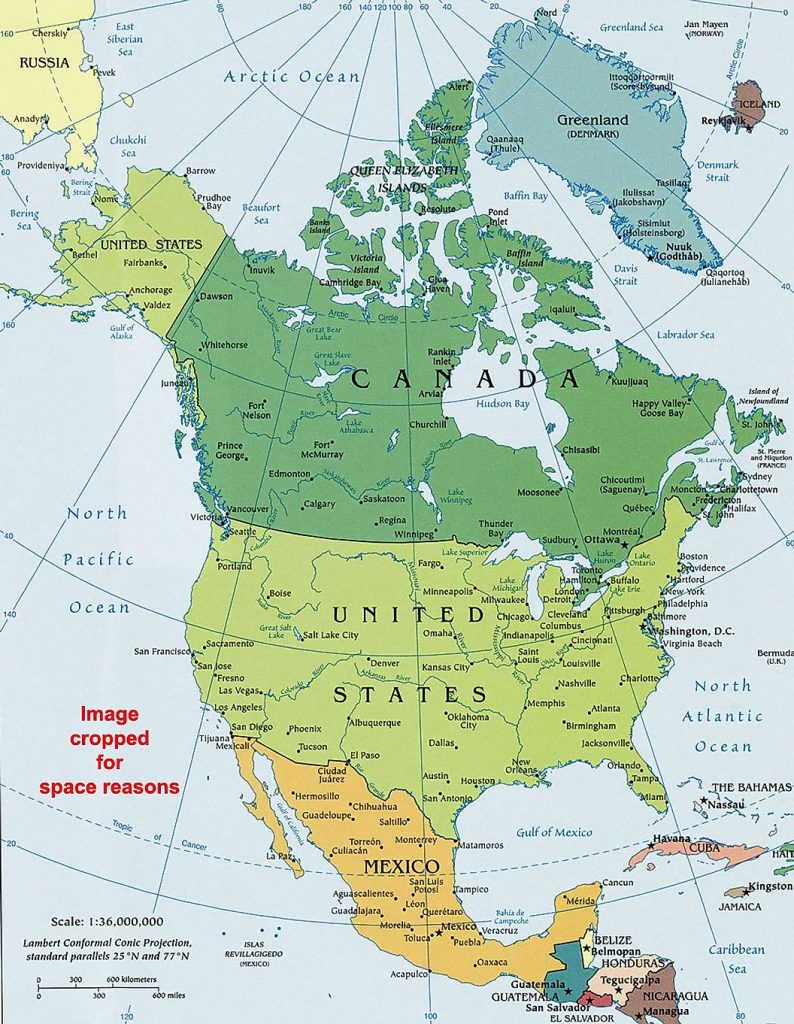
    Canada (dark green), and the United States (light green). Note that the border goes from coast to coast.

    The Canada / United States border runs from the Atlantic Ocean west all the way to the Pacific Ocean. So our border runs across the entire continent.

    It is the longest international border in the world between two countries. It runs 8,891 kilometers (5,525 mi) long. The border has two parts: Canada’s border with the contiguous U.S. to its south, and Canada’s border with the U.S. state of Alaska in the Northwest.

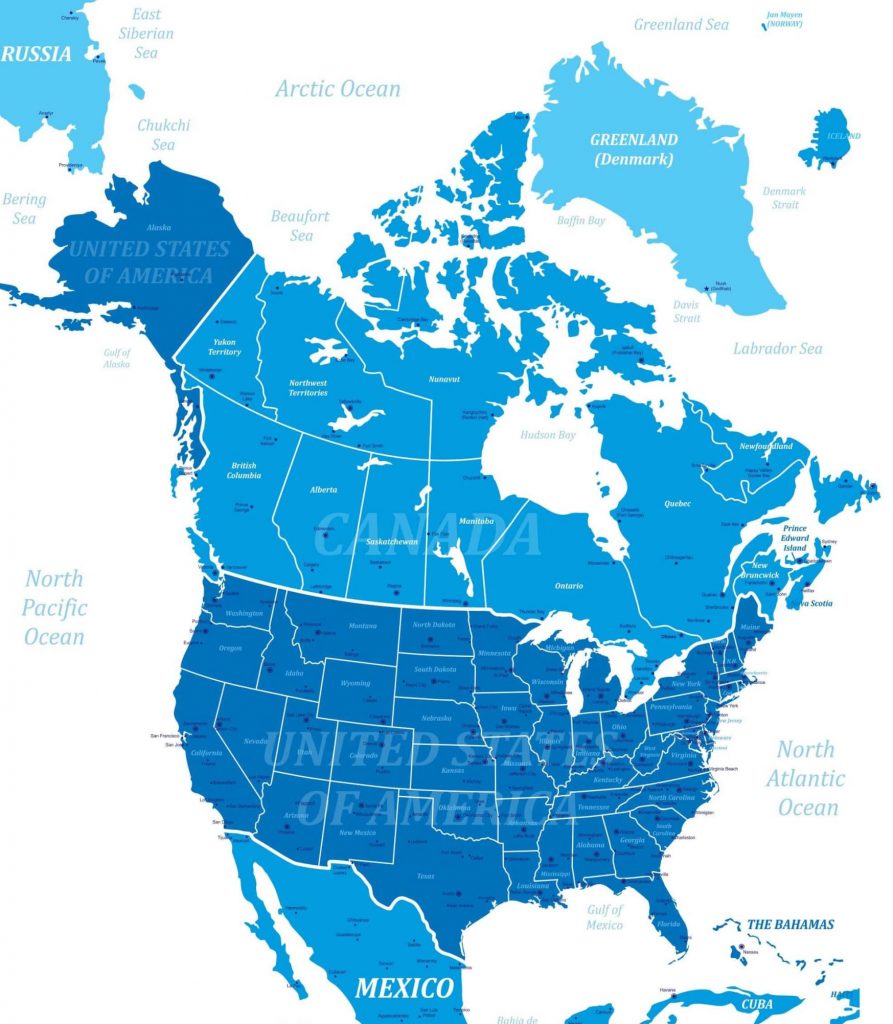
    Map showing border provinces and states

    1. Let’s draw the border and add as many details as possible. Get out a white sheet of paper, or notebook.

    2. BORDER PROVINCES:

    Last time we looked at the Eastern provinces. Note, Quebec and New Brunswick DO border the U.S. Newfoundland, PEI, and Nova Scotia do not border the U.S. Let’s look closer at Ontario and Manitoba today.

    3. BORDER STATES:

    We started looking at some of the states that border Canada directly. Let’s start by taking a closer look at Maine. Next week, let’s look at New Hampshire and Vermont.

    Let’s keep spend time getting to know those provinces and states!


    CLASS FEEDBACK

    Once you’ve done the session and spent a bit of time reviewing each topic and link, please send me a message in our Threema group that you’ve done the review.